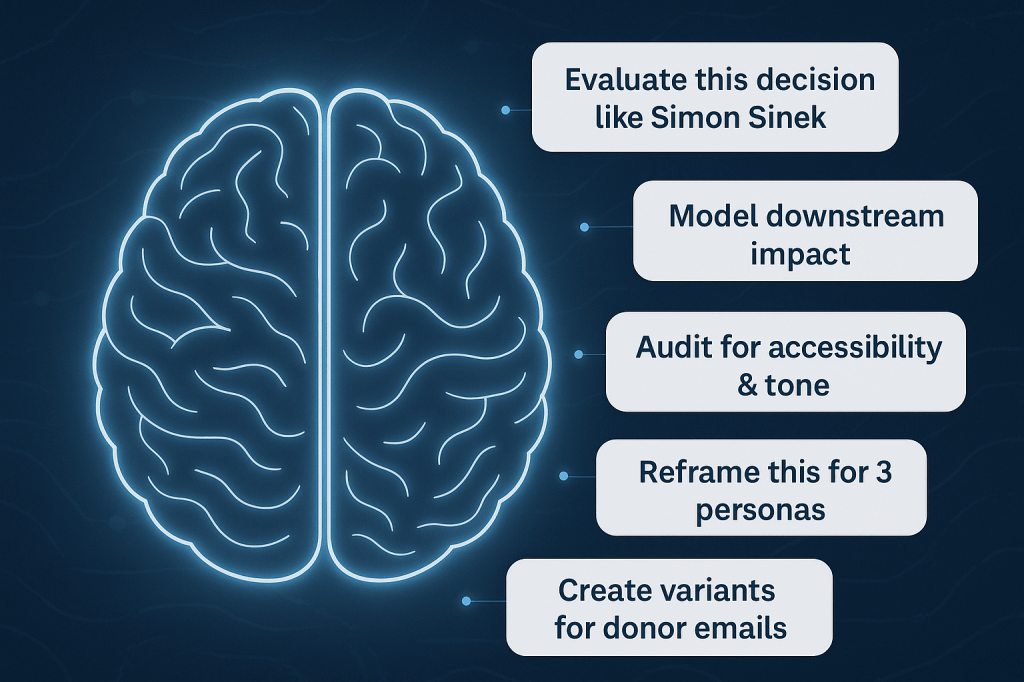
brain with floating AI prompts

Next generation AI prompts and how they will transform work in 2026

AI tools are evolving rapidly, but the real revolution isn’t just in smarter algorithms. It’s in how we prompt, guide, and collaborate with these systems. If the prompts of 2023 were “write my blog post” or “summarize this article,” the prompts of 2026 will reshape what it means to think, decide, and work.

Let’s look at some next generation AI prompts, why they matter, and how you can build this power skill to stay ahead. 

The shift from simple commands to strategic collaboration

Ask anyone who used ChatGPT or other LLM-powered tools in 2023, and you’ll hear the same story. AI made everything a little bit easier and a lot faster. With one command, you can have AI write an email or social post, create a checklist or edit your content.

But as AI becomes central to every knowledge worker’s toolkit, prompts will become less about one-off tasks and more about nuanced collaboration. Your AI assistant is moving beyond “do this” to “think with me.”

This shift is significant, because in the coming years, those who master strategic prompting will set the standards for efficiency, insight, and impact in the workplace. It’s a difference as fundamental as learning Google search in the 2000s or project management basics in the 2010s.

What makes a next generation AI prompting different

Great prompts in 2026 won’t just be clear and specific. They’ll embody a new kind of leadership:

  • Context-rich and goal-oriented

The best prompts give the AI backstory, constraints, and a desired end result.

  • Intellectual integration

You’ll blend expert opinions, critique decisions, and ask AI to serve as a challenger or thinking partner and not just a content generator.

  • Multi-format and multi-step

Modern prompts will expect the AI to analyze, summarize, synthesize, and output results for different stakeholders and channels at once.

  • Bias-awareness and inclusivity

Instead of simply generating content, top prompts instruct AI to screen for accessibility, conscientious language, and systemic impacts.

  • Consequential foresight

The leading edge of prompts will model downstream effects and surface scenarios leaders need to plan for.

Prompt engineering will be a core skill

Prompting is no longer about getting decent results out of a clunky tool. It has become a core operating skill for strategists, analysts, marketers, product leaders, and executives. Those who learn the new prompt language will get more out of their AI partners and spend less time bridging gaps between what they want and what AI delivers.

Next generation AI prompt examples

Here are examples and use cases that showcase what prompting mastery will look like by 2026. Adapt and experiment with these to boost your own workflows.

Rethink decision-making with a strategic partner

Prompt:

Act as my strategic thinking partner. Here’s what I’m stuck on…

Use case example: “Act as my strategic partner. I’m trying to decide whether to invest more in international student recruitment or in expanding adult learner programs. Here’s what I know so far…”

AI is no longer a passive assistant. By inviting it in as a strategic partner, you unlock cross-checks, scenario planning, and perspective-broadening dialogue. This is especially powerful in complex decisions where human bias or bandwidth might limit analysis.

Synthesize leading thinkers and frameworks

Prompt:

Combine the perspectives of [Author A] and [Author B] to critique this idea.

Use case example: “Evaluate our plan to restructure team check-ins from weekly all-hands to asynchronous updates, using the leadership frameworks of Cy Wakeman and Simon Sinek. What strengths, risks, and cultural impacts should we anticipate?”

This prompt pits efficiency and accountability (Wakeman) against connection and inspiration (Sinek), which is a common tension in remote and hybrid leadership. It forces AI to weigh emotional truth vs. emotional management, and productivity vs. purpose.

Engineer persuasive content with behavioral insight

Prompt:

Analyze this content for psychological triggers, then rewrite it to resonate with [audience persona].

Use case example: “Review this alumni donation page. What psychological levers are being used? How could this better resonate with first-gen students from rural areas?”

Personalized, high-impact content becomes standard, not a luxury reserved for big brands. The best prompts look beyond surface-level edits to shape content for real emotional effect.

Summarize, reformat, and distribute 

Prompt:

Turn this 2-hour meeting transcript into 5 action items, 3 questions for leadership, and a Slack post summary.

Use case example: “Here’s a Zoom transcript of our design sprint. Give me a TLDR, stakeholder-specific summaries, and a timeline.”

Why it matters:

AI becomes the go-to tool for knowledge distribution. You get actionable summaries and communication-ready outputs in minutes, saving leaders and teams hours each week.

Personalize communication at scale

Prompt:

Create multiple message variants based on this user’s behavioral data and communication style.

Use case example: “Using Clive campaign data, generate 3 re-engagement email variants that match a warm but efficient tone. Target parents who clicked the financial aid link but didn’t convert.”

AI-powered personalization shifts from nice-to-have to standard operating procedure, equipping teams to address micro-segments and individuals with far greater relevance.

Audit for values, ethics, and inclusion

Prompt:

Audit this content for accessibility, inclusivity, and ethical phrasing.

Use case example: “Scan this chatbot script for bias, stereotype triggers, and readability below a 9th-grade level.”

With increasing regulatory pressure and cultural expectations, prompts that screen content for bias, accessibility, and inclusive language become non-negotiable. These help protect brands and empower more equitable engagement.

Anticipate outcomes and design responsibly

Prompt:

Help me think through the downstream consequences of this product feature.

Use case example: “We’re launching an AI-powered tutor to help students with writing assignments. What are the second- and third-order effects? What should we prepare for?”

The skill of prompt engineering extends into systemic thinking. You’ll use AI to challenge your vision, anticipate unintended effects, and identify risks early.

Benefits of next-level prompting

Adopting these advanced prompting techniques leads to:

  • Faster, more relevant decision cycles: Actionable insights and summaries delivered in the moment.
  • Consistency and inclusivity: Communication that meets ethical standards and resonates with diverse audiences.
  • Personalization at scale: Content and outreach that meet users where they are.
  • Operational efficiency: Multi-step summaries, reformats, and distribution handled in minutes.
  • Foresight and risk management: Better anticipation of systemic impacts and ethical considerations.

Prompt engineering can be the key to more intentional, resilient, and creative teams.

Leading in the age of AI-native work

Prompting is no longer about wringing results out of black boxes. It’s about leading strategic, creative, and responsible collaboration between human and machine.

If your prompts still sound like “write an email,” now is the time to level up. The future belongs to those who know how to ask better questions, challenge assumptions, and guide AI as a true thinking partner. Start practicing these prompts today, and position yourself (and your organization) to stand out in the next AI-powered chapter of work.

What about you? What are your best examples of next-gen prompts?

What Higher Ed VPs should know about AI 

Higher education is entering a new chapter. Yes, enrollment is shifting, budgets are tightening, and student expectations are evolving faster than ever, but these challenges also open the door to innovation. One of the most exciting tools at the center of this transformation is AI, as it is a real opportunity to enhance efficiency, personalize experiences, and amplify your team’s impact. You don’t need to be a tech whiz to take advantage of it, but you do need a clear understanding of what AI can do today, where it’s already making a difference in higher ed, and how to lead the way.

Let’s take a look. 

What AI is and isn’t

Before we even think about strategy, we need to understand what AI is and isn’t. It’s not a replacement for your human team, nor is it a silver bullet that will help save struggling departments or instantly cut your workload in half. It’s more like an always-on assistant (I often call it your bionic arm), that can help in a number of ways, such as

  • Drafting emails and reports so much faster than you can
  • Summarizing complex meeting transcripts or documents
  • Analyzing enrollment or marketing trends
  • Generating different versions of content for different audiences

But someone still needs to set the direction, provide the context, and review outputs for alignment with your unique mission.

Higher ed‘s current use of AI

Many colleges and universities are no longer wondering if they should use AI. They’re already refining how they use it strategically. For example,

Marketing and Communications

  • Segment emails for prospective students, alumni, and donors
  • Draft event invites and newsletters tailored for different audiences
  • Audit communications for tone, consistency, and inclusive language
  • Summarize content performance or campaign reach

Example: Marketing teams use AI tools to generate multiple email or invitation drafts, which frees up time for higher-level planning.

Enrollment Management

  • Personalize interest-based content at scale for different types of students
  • Identify signals of student interest or drop-off through identifying patterns
  • Summarize notes from hundreds of student interactions to detect themes

For instance, by using AI to analyze application essays or email interactions, institutions can detect trends in applicant concerns, then address them directly in targeted outreach.

Advancement and Alumni Relations

  • Draft donor letters and campaign communications customized for audience segments
  • Summarize long board reports into digestible briefs
  • Generate recognition copy for milestones or giving anniversaries

AI can save many hours by helping staff convert board updates into concise leadership emails that keep everyone informed quickly.

Student Success and Advising

  • Automate regular nudges for key milestones to boost student retention
  • Personalize messages to students who might be at risk or need support
  • Translate complex policy language into plain English tips or FAQs

For examples, advisers may use AI-powered platforms to proactive reach out to students ahead of registration deadlines.

Internal Operations and Administration

  • Summarize transcripts or documentation from meetings and committee sessions
  • Draft and edit job descriptions
  • Quickly create executive summaries from sprawling reports

HR and operations teams rely on AI to condense meeting notes into checklists and action items, which makes follow-through easier across teams.

What Higher Ed VPs need to focus on

With AI already integrated into so many aspects of campus operations, here are a few ares that VPs should focus on:

Strategic structure

The real magic happens when you move past occasional, one-off uses (“write this newsletter”) and start structuring AI into ongoing workflows that learn and improve. AI is about compounding value. For example, once you have a playbook for drafting segmented campaigns or summarizing meeting notes, you can refine it over time, increasing quality while saving more staff time with each cycle.

Strategy guides the tools

AI’s strength is in scale and speed, and definitely not in institutional memory, culture, or nuanced judgment. This means no matter how powerful the tool, your strategy always leads the way. You know what resonates with your alumni better than any AI tool ever could. 

Focus on real-world problems 

Ask practical questions such as

  • Where are staff bogged down by repetitive or time-consuming tasks?
  • What processes cause delays or burn valuable staff hours?
  • Which areas could benefit from faster, more personalized communication?

Start by solving the real bottlenecks your teams talk about every month. That’s where AI delivers the biggest, most immediate ROI in higher education.

Questions every higher ed leader should ask 

If you want AI to be a multiplier instead of a distraction, start with these questions:

Where are we using AI already and who is governing it?

Chances are, faculty or staff are already using tools like ChatGPT, Grammarly, or other writing aids. You may already have AI-features in your Content Management System. Map out where these tools are deployed and who is making operational or ethical choices about them. 

Do we have shared guidelines?

Establish simple, clear principles for responsible AI use:

  • What counts as acceptable use?
  • Are outputs fact-checked for accuracy and tone?
  • Does the use align with your brand and values?
  • How will you ensure accessibility for all users?
  • Are there any other legal ramifications that we need to be aware of?

What type of training is needed? 

Staff anxiety about “messing things up with AI” is real. Leaders can speed up adoption and prevent misuse by offering guides, practice sessions, and safe spaces to experiment and become more proficient.

What higher ed VPs shouldn’t worry about

Here’s what you do not have to do:

  • Learn prompt engineering from scratch. Use, adapt, and share prompts that have already proven effective (see these prompt examples).
  • Approve every single AI use case. Trust frontline teams with clear parameters and encourage smart experimentation.
  • Invest heavily on day one. Most effective AI solutions start at departmental or pilot scale. Scale up tools only when you have evidence of need and success.

The shifting role of higher ed leadership in the AI era

The institutions that succeed won’t necessarily have the flashiest tech stack. Neither will they be the ones who cling to old ways of thinking. Instead, those that thrive will be led by VPs and executives who align AI adoption with mission and culture, set clear expectations and boundaries, encourage cross-team sharing and learning, and stay committed to ethical, accessible, and transparent practices.

What about you? What would you add to the list of things that higher ed VPs should know about AI?

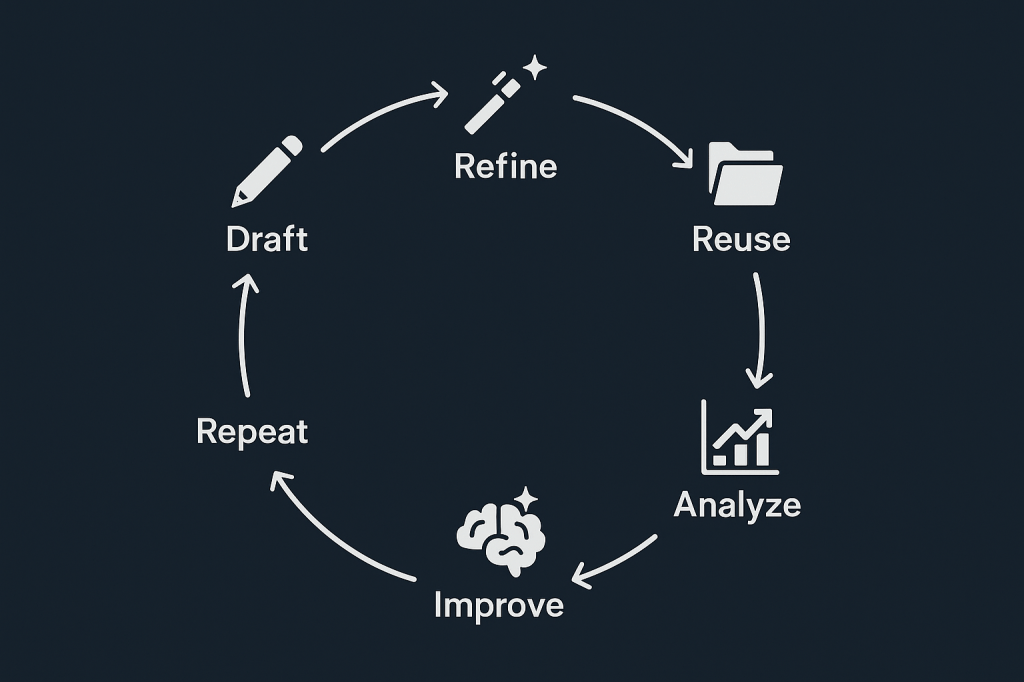
flywheel of building compounding AI

How higher ed marketers can build an AI Flywheel

I’ve been thinking about higher ed a lot (even more than usual) these days, as it’s facing some challenging times, so I’ll be posting a bit more higher-ed focused content on here.

AI isn’t just another way to save a few minutes on your next campaign. For marketers in higher ed, it offers a lot more. In fact, if used wisely, it can become a system that makes every piece of work more efficient, more insightful, and more effective the more you use it. It’s often referred to as the AI Flywheel.

Let’s take a look at how higher ed marketing teams can move beyond one-off AI prompts and quick fixes, and start building systems that get smarter, faster, and more valuable with each cycle. If you’re spending too much time feeling like every enrollment or giving campaign is a new lift (like planning Welcome Week for the third time in six months), this approach will help you shift from reinvention to momentum.

Why AI in higher ed is not just about faster emails

Higher ed marketers operate in a world defined by big challenges and limited resources. Budgets are tight, teams are lean, and institutional expectations keep growing. And yes, you’re still somehow expected to write like a copywriter, strategize like a VP, and test like a CRO, all before lunch.

Think about it like this: You don’t want a robot that spits out a decent subject line when you ask. Instead, you want to me more ambitious and develop a process that helps your marketing team get sharper, learn from every email sent, and make the next campaign even more relevant, personalized, and achieve better results.

What is the AI Flywheel?

The AI Flywheel is a feedback loop with the intention to compound value. Instead of approaching tasks in isolation, the AI Flywheel connects every prompt, every campaign, and every data point so that the next round is always easier and more effective.

For example:

  • Ask AI to draft initial content for anything from an email to an event invitation.
  • Refine the output, shaping the tone and content to match your institution’s brand, tone, and values.
  • Reuse the structure or logic behind successful outputs for new use cases or audiences.
  • Analyze the response data. Did students click more? Did parents open less? What seemed to resonate?
  • Feed those insights right back into the next prompt, so that each turn becomes faster and smarter.

Instead of improving by accident, you develop a plan. Your systems, prompts, and institutional knowledge compound, which can make each campaign more agile and aligned.

How to build an AI Flywheel in higher ed marketing

Here’s how your marketing team can get started:

1. Design prompts for systems, not just single results

Don’t just ask AI to “write a welcome email for new students.” Instead, break the campaign down and think in terms of building blocks you and your team can reuse across future projects.

For a student welcome series, your AI prompt structure might include:

  • A general template with modular sections (intro, campus highlight, quick next steps, CTA)
  • Personalization variations (first-generation, out-of-state, transfer)
  • Follow-up text messages
  • Web teasers for cross-channel promotion

Whenever possible, capture not only the result but also the reusable logic and variants. This way, your initial prompt seeds a content system rather than a one-and-done piece.

2. Create a living context file 

AI is only as good as the context you give it. Feed your key institutional inputs into your AI companion or prompt library:

  • Brand voice and tone (welcoming, inclusive, aspirational, empathetic)
  • Personas (prospective students, parents, alumni, faculty, donors, employers)
  • Differentiators (small class sizes, experiential learning, first-year programs)
  • Strategic goals (increase applications, grow out-of-state reach, boost giving, increase student retention)

Example:

“Using our brand voice, draft a headline and subhead for our rural-first-gen scholarship landing page.”

Your context doc becomes a shared institutional brain, without needing to Slack a coworker for that one tagline she wrote back in 2019.

3. Turn every output into a future input

Every campaign, message, or landing page is a learning opportunity. Once you send an email with great open rates or a text message that parents forward widely, don’t just celebrate and move on. Feed that result back into your AI system.

For instance, prompt your tool with:

This open house email had a 52% open rate and strong parent engagement. Use it as a model to draft a campaign for our admitted student event.

This way, you’re building institutional intelligence that compounds, turning AI into a digital team member who remembers what worked (and what fell flat) last semester, last year, and beyond.

4. Systematize with a prompt library

Organize your prompts and templates so you’re never starting from scratch. Think of this as your team’s living playbook, where you collect and annotate things like

  • Outreach plan evaluations
  • Donor message variants based on giving history
  • Career-focused homepage copy
  • Accessibility and language audits
  • Infographic summaries

This living library becomes more valuable with each project, which can help make every new campaign both faster and more targeted.

Benefits of the AI Flywheel for higher ed teams

Scalable personalization: AI enables you to deliver tailored messaging, but the flywheel structure prevents your small team from reinventing the wheel with every campaign.

Consistent messaging: Centralized inputs, living prompt libraries, and reusable assets mean that your voice, values, and strategy show up seamlessly wherever your audience is.

Smarter and faster decision-making: Data feeds back into your system after every initiative, enabling rapid learning and focused improvements instead of guesswork.

Sustainable marketing systems: Even with staff changes or shifting priorities, your documented systems make it easy for new team members to ramp up and keep improving what’s working best.

How to get started

You don’t need a large team or a massive investment to begin. Start small and intentionally:

  • Save your three most-used prompts and tweak them with every cycle
  • Keep a shared doc with core messaging, personas, and brand guidelines
  • Make a habit of reviewing results and adding insights back into your system

Over time, your flywheel will pick up speed, giving your institution compound returns and marketing agility.

What about you? Have you started working on your AI Flywheel?

clock with AI symbols, brain in the middie

20 AI prompts that will save you hours every week

You know AI can help you get more done faster. But too often, it feels like one more tool to manage rather than a true productivity partner. The missing piece: Clear, structured prompts that make AI do the heavy lifting.

Here are some ideas to get started with 20 ready-to-use AI prompts that distill tasks into fast, repeatable wins. Whether you handle operations, marketing, hiring, analytics, or content creation, I hope these examples will save time and deliver consistent results.

Good prompts matter 

Before jumping into specific prompts, it is essential to understand what separates a quick win from wasted time.

A strong prompt should:

  • Include relevant context so the AI understands your goal
  • Request a defined outcome (such as a checklist or email)
  • Specify the structure or tone you expect in the answer

Clear, intentional prompting transforms AI from a novelty into a practical tool for day-to-day efficiency.

Prompts for business owners and operators

Target operations tasks with precise instructions to introduce structure and speed up repetitive processes.

1. Build a Standard Operating Procedure (SOP)

Prompt:

Write a clear, step-by-step SOP for how we [task: onboard new clients into our product]. Use short, numbered steps and include any tools we need to use.

How it works: You receive a process document organized for new or existing employees, reducing onboarding time and errors.

2. Conduct a process improvement audit

Prompt:

Here is our current process for handling inbound leads: [paste process]. Suggest improvements using automation or AI, and explain how each change saves time.

What to expect: Actionable recommendations with time-saving calculations to fuel continuous improvement strategies.

3. Use the Eisenhower matrix for prioritization

Prompt:

Here are 10 tasks I need to get done this week. Help me prioritize them using the Eisenhower Matrix. Tasks: [list].

Result: AI provides a clear task matrix, allowing decision-makers to focus on what is urgent and important.

High-impact prompts for marketers

AI can shortcut ideation, optimization, and content repurposing processes. Structure is fundamental for valuable outputs.

4. Generate campaign ideas

Prompt:

Give me 5 creative campaign ideas for promoting our [product/service] to [target audience] with a budget of [enter budget range].

Benefit: AI offers campaign concepts tailored to real constraints, shortening planning cycles.

5. Generate ideas for blog posts

Prompt:

Analyze the content on [URL] and give me 10 blog post topic ideas optimized for the keyword ‘[keyword]’. For each, include a suggested title and a meta description.

Why it’s useful: This prompt helps you generate content ideas that are both strategically aligned with your existing site and optimized for SEO. You’ll walk away with not just broad topic direction (macro) but also ready-to-use titles and descriptions (micro) ,  accelerating your drafting process and boosting your search performance.

6. Repurpose Content for Social Media

Prompt:

Take this blog post: [paste blog text] and create 3 LinkedIn posts and 2 Instagram captions using a friendly, helpful tone.

Time saving: Redistribute long-form content into bite-size marketing assets in minutes, not hours.

7. Draft an engaging promotional email

Prompt:

Write a concise, engaging promotional email for [offer] that encourages [action]. Keep it under 150 words and include a strong CTA.

Outcome: A ready-to-edit email draft, consistent in style and focused on driving immediate action.

Prompts for content creators and educators

Use AI to streamline educational and creative production, focusing on clarity and engagement.

8. Build an agenda for a webinar

Prompt:

Build a 30-minute webinar agenda on [topic]. Include 3 key talking points, 2 interactive moments, and 1 call to action.

Practicality: Provides a structured, audience-focused plan for live events.

9. Turn documents into slide summaries

Prompt:

Here’s a long document: [paste or describe]. Create a 5-slide summary presentation with slide titles and bullet points.

Efficiency: Turns dense materials into high-level summaries viewers can process quickly.

10. Simplify complex topics for beginners

Prompt:

Explain [complex concept] in simple terms suitable for beginners. Use analogies and bullet points.

Value: Makes knowledge accessible, supporting onboarding and learning initiatives.

Streamlining hiring and HR with AI

Automate writing and talent screening with prompts configured for quality and inclusion. Check out my detailed post with more prompts here.

11. Craft compelling job descriptions

Prompt:

Write a compelling, inclusive job description for a [role] at a [type of company]. Include responsibilities, qualifications, and company culture highlights.

Advantage: Ensures roles are marketed attractively and inclusively, saving time on rewrites.

12. Generate interview questions

Prompt:

Give me 10 behavioral interview questions to assess a candidate’s problem-solving skills for a [job title] role.

How it helps: Builds precise question sets that test relevant competencies.

13. Onboarding checklist creation

Prompt:

Create a 2-week onboarding checklist for a new [role], with tasks broken down by day and links to relevant resources.

Desired outcome: Smooth onboarding processes mean faster time-to-productivity and less manager oversight.

Prompts for analysts and administrative efficiency

Extract insights and move from raw data to actionable summaries without manual labor.

14. Summarize spreadsheet data

Prompt:

Summarize this spreadsheet data: [paste table or describe data]. Highlight key trends and anomalies.

Value: Convert messy sheets into insights for focused, strategic reviews.

15. Summarize Meeting Notes

Prompt:

Summarize the key decisions, action items, and next steps from this meeting transcript: [paste notes].

ROI: Ensures important discussions result in tangible next actions.

16. Suggest useful dashboard charts

Prompt:

Suggest the most useful charts to include on a dashboard for tracking [goal, e.g., website conversions]. Explain why each is valuable.

Performance Tracking: Prioritizes metrics that matter, enabling smarter dashboard design.

General productivity hacks

Use AI to design repeatable frameworks, triage communications, and enforce strategic time allocation.

17. Create templates that save time

Prompt:

Create a reusable template for writing weekly status updates to my team. Include sections like ‘Highlights’, ‘Blockers’, and ‘Next Steps’.

Standardization: Fosters clarity and unity in reporting, saving time weekly.

18. Triage Slack messages

Prompt:

Here are 10 recent Slack messages I received across different channels. Help me classify each as Needs my action, FYI, or can be ignored. Messages: [paste messages].

Why it’s useful: This prompt helps you cut through the noise in team communication tools like Slack, Teams, or Discord. By instantly identifying what needs your attention versus what doesn’t, you can reclaim your focus and stop letting pings and notifications derail your deep work.

19. Design a weekly planning grid

Prompt:

Help me plan my week. I want to spend 60% of my time on deep work, 30% on meetings, and 10% on admin. I work Monday–Friday, 9–5.

Desired outcome: Enables intentional time management with built-in deep work prioritization.

20. Encourage personal reflection

Prompt:

Guide me through a weekly reflection. Ask me 5 questions about what went well, what I learned, and what to improve next week.

Continuous improvement: Promotes regular self-review, building resilience and alignment.

Combine prompts

When real transformation is the goal, don’t just use standalone prompts. Combine them into workflows. For example:

  1. Craft a compelling job description (#11)
    Start by generating an inclusive, well-written job listing that attracts the right candidates.
  2. Create an onboarding checklist (#13)
    Once the role is filled, immediately build a 2-week onboarding checklist so you’re ready to hit the ground running.
  3. Turn onboarding docs into a slide summary (#9)
    Transform lengthy onboarding materials into a 5-slide overview presentation for your new hire’s first day.

By stacking these prompts, you move from role definition → hiring → onboarding with minimal lift. You reduce context-switching, create consistency across hiring assets, and make the employee experience smoother, all in under an hour of focused AI-assisted work.

Stacking prompts leverages compounding time savings, multiplying your impact across every phase of a project.

Wrap-up

Great AI prompts are not shortcuts but disciplined processes encoded into accessible language. They allow you to automate what’s repetitive, delegate without confusion, and direct your best effort where it counts.

Bring intentionality and structure to every AI interaction, and you will transition from spending time on busywork to delivering meaningful, strategic outcomes.

What about you? What are your favorite time-saving AI prompts?

ai and human shaking hands

From day one to day 90: Using ChatGPT to support onboarding and continuous learning

Why AI can transform onboarding and training

Onboarding and continuous learning are critical to building a strong, capable workforce, but they can also be time-consuming and inconsistent. New hires often feel overwhelmed due to  information overload. At the same time, managers are stretched thin trying to provide personalized support. Therefore, it’s no surprise that companies are starting to explore ways in which AI can help provide a scalable and accessible way to enhance the onboarding and training experience. This isn’t about replacing human interaction, but about making important information more consistent, approachable, and available on demand. For the purpose of this post, we will focus on ChatGPT.

Instant and personalized knowledge bases

ChatGPT can act as an always-available assistant for new hires, answering common questions about processes, policies, tools, and culture. Instead of waiting hours or days for a manager’s reply, a new team member can ask simple questions such as “How do I submit a PTO request?”, “How do I request help from IT?”, “Who needs to approve external communications before they’re published?” or “What branding guidelines should I follow when creating social media posts?”. Note that it’s easy to train custom versions of ChatGPT by feeding it internal documentation like your handbook and communication playbook, to deliver answers specifically for your company. 

Role-specific learning paths

Managers and HR teams can use ChatGPT to quickly create customized onboarding checklists or learning plans for different roles. For example, you can use a prompt like “Create a 30-day onboarding plan for a new Customer Success Manager for a SaaS company/[your company]”. You can even take it a step further by asking for key success metrics or for further details about a specific objective, for a daily planner that includes recurring meetings like stand-ups, or for a table indicating which tasks involve other team members and which ones are self-guided. 

This approach ensures that every new hire has a thoughtful, structured experience without requiring managers to reinvent the wheel every time.

Practicing scenarios and soft skills

ChatGPT can simulate real-world conversations, giving new hires a chance to practice soft skills in a safe environment. For example:

  • Handling a difficult customer interaction
  • Conducting a feedback conversation with a colleague
  • Asking questions during a discovery call
  • Conducting a Quarterly Business Review (QBR)
  • Managing a customer who missed key onboarding deadlines.

Just provide ChatGPT with instructions like “Act as a customer who…” or “Simulate a situation where…”, or “Pretend to be a user who”. These role-playing exercises help employees build confidence and prepare for real-world challenges before they encounter them.

Reinforce ongoing training

Of course, training doesn’t stop after the first 90 days. ChatGPT can also serve as an ongoing resource for you when it comes to things like

  • Quizzing employees on company values, product knowledge, security protocols, or value proposition
  • Scenario testing, where employees can walk through different case studies and challenges.
  • Microlearning sessions, allowing employees to engage in bite-sized learning at their own convenience.

Here are some examples:

After a new product release, Customer Success Managers could quiz themselves on the new features by using prompts such as “Give me 5 multiple-choice questions about [product]’s new feature rollout.” Or an Account Executive could ask ChatGPT to act as a specific buyer persona and provide feedback on how well the AE explained the value of a specific feature set. You can also use the tool to help prepare for potentially uncomfortable internal conversations. For example, you can ask ChatGPT to “Act as a teammate to whom I need to give critical feedback about their time management skills.”. Examples of microlearning opportunities are a CSM quickly refreshing their knowledge on upcoming feature names before a call with a customer, or a Support Engineer getting a summary of the last 3 releases to help explain to a customer why they should upgrade to the latest version of the product. 

Fostering a culture of continuous learning is not just beneficial for everyone, but it can also be fun. Consider creating a Slack channel where team members discuss creative uses of AI that help them in their roles. 

Support managers and team leads

ChatGPT isn’t just for new hires, but it can also be a valuable tool for the people supporting them. Managers and trainers can use AI to:

  • Get suggestions on how to improve existing training materials
  • Provide ideas for mini-”homework” assignments for each role on the team to continue to sharpen their skills (“Explain our newest feature like you’re talking to a non-technical customer”)
  • Help team members hone their communication skills (for instance, have ChatGPT generate an email from a customer who is frustrated with something specific and then assign the team member the task to respond to it)
  • Reinforce knowledge of new product features, internal tools, or SOPs by having team members quiz themselves (“Summarize the top 2 use cases for marketers and for developers when interacting with X”).

By using ChatGPT, managers can make professional growth feel more continuous and accessible, help employees practice in a safe space, and foster a culture of curiosity, all without adding heavy training costs. It also frees up time spent on repetitive tasks and frees managers up to focus more on mentorship.

These are just a few ideas on how to use ChatGPT to help with onboarding and continuous learning, making it more consistent, accessible, and effective, while allowing managers and team leads to have more time for individual coaching. By combining the best of human guidance with the capabilities of AI, organizations can create a better experience for everyone involved.

What about you? What are your ideas for using ChatGPT for onboarding and ongoing training?