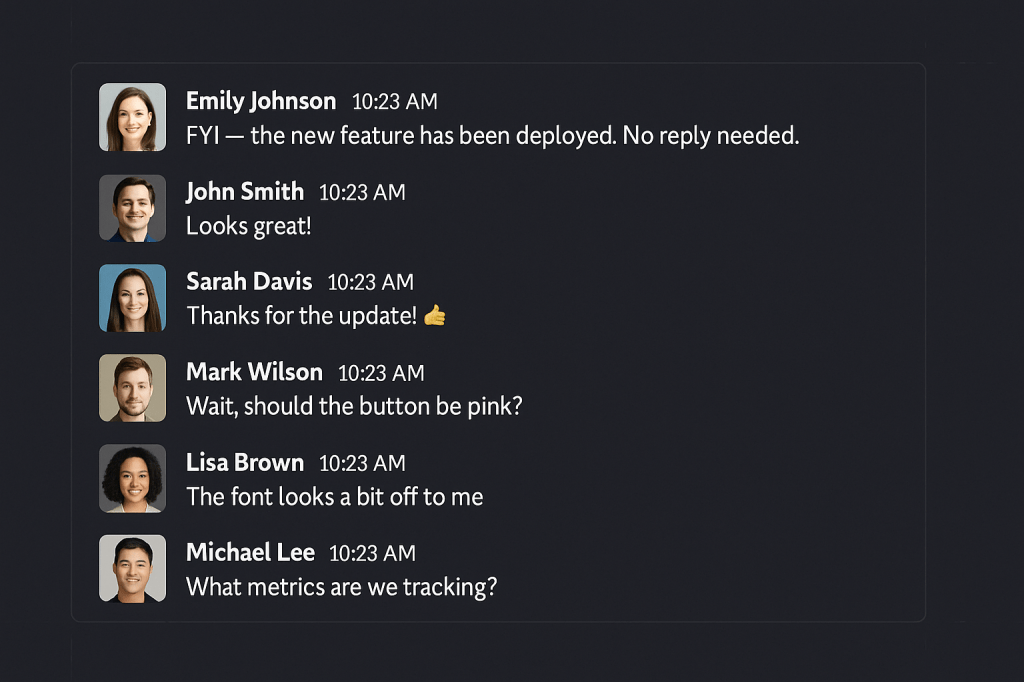
slack conversaion

7 pitfalls of Slack (and similar tools)

Slack and similar messaging platforms, like Teams and Mattermost, promised frictionless communication, faster collaboration, and a reprieve from endless email chains. And to be fair, they’ve delivered, but not without their own set of challenges. These communication platforms can just as easily cause dysfunction as they can drive productivity. Here are some common pitfalls.

1. Expectations of always being on

The problem:
Real-time chat fosters the illusion that everyone should be instantly reachable. That constant hum of notifications creates low-level anxiety and can kill deep focus. 

Example scenario:
Jasmine is a UX designer who starts working at 8:00 AM and wraps up by 5:00 PM. But her manager often messages her at 9:30 PM with “quick ideas.” Even though Jasmine doesn’t have to respond, she feels pressure to and it’s wearing her down.

Mitigation:
Normalize using Slack’s “Do Not Disturb” feature. Set team guidelines like “no messages after 6 unless urgent” and encourage scheduling messages with tools like Slack’s built-in delay feature. Confession: I spend way too much time on my laptop, and often respond to messages outside of regular hours. I’m even guilty of posting outside of those hours. However, there is no expectation that I expect a response at those times. (Note to self: I need to remind my team of this). 

2. Important info gets buried

The problem:
Slack can’t distinguish between what’s urgent and what’s just active. Critical updates often disappear under a pile of less important chatter.

Example Scenario:
The engineering team shares a Slack message in #product-news:
“API v1.2 will be deprecated in 30 days. All third-party integrations need to migrate to v2.0.”
Within a day, the message is swallowed by a stream of stand-up check-ins and demo GIFs. A partner success manager never sees the post and doesn’t notify a key enterprise customer,  resulting in broken integrations and an angry escalation.

Mitigation:
Use tools like Slack’s “Highlight Words” feature to alert people to terms like “deprecation,” “urgent,” or “migration.” Better yet, integrate Slack with your CRM or ticketing system to automate critical alerts to the right people since you should not rely on a single Slack message as your system of record.

How to set up Highlight Words, click your profile picture in the top right of Slack and select Preferences -> Notifications. Scroll down to My keywords and enter the words you want to track, separated by commas.

3. Slack becomes the default

The Problem:
Slack messages can easily be misread or misinterpreted, since you don’t see someone’s facial expression or hear their tone. Plus, they’re often very short.

Example scenario:
After a tense customer call, the customer success manager starts a thread criticizing the product team’s recent release. The product lead replies defensively. Within minutes, the conversation derails and now it’s visible to the majority of the company.

Mitigation:
Create clear guidance: feedback and conflict resolution should happen in 1:1 video chats or designated retrospectives. Use Slack for transparency, not tension.

4. It erodes focus

The problem:
Notifications and context-switching fragment focus, leaving team members busy but not productive.

Example scenario:
Daniel blocks off 9–11 AM for deep work on a strategy deck. But he gets pinged 8 times in 30 minutes with questions, requests, and check-ins. He never hits flow state and ends up working late to finish the deck.

Mitigation:
Support “focus hours.” Encourage team members to pause notifications, mute non-critical channels, and respect scheduled work blocks. Deep work should be protected, not penalized. I struggle with this often, as I have to resist the urge to respond, especially when someone pings me directly. When you feel like you can only be productive outside of work hours, it’s a problem that needs to be addressed.

5. Channel chaos

The problem:
When there are too many channels or unclear norms and naming conventions, people don’t know where to find or post what.

Example scenario:
Three team members post updates about the same client in #client-discussion, #sales-wins, and #random-client-notes. No one sees the full story, and someone accidentally duplicates work already done.

Mitigation:
Audit and consolidate your channels. Create clear naming conventions like  #client-[name], #proj-[initiative]), #success-help-and-feedback. Make a simple channel guide part of onboarding.

6. Unconscious exclusion

The problem:
Fast-paced Slack culture can exclude people who aren’t always online, aren’t native English speakers, or need more time to process and respond.

Example scenario:
During a fast-moving brainstorm in Slack, the extroverts dominate with rapid-fire messages. Maria, a thoughtful team member who prefers time to think before weighing in, ends up not contributing, even though she had a great idea the next morning.

Mitigation:
Encourage async participation. After a brainstorm, ask for additional input later in the day. Use threads and “summary” messages to recap discussions for those in other time zones or working styles.

7. The “reply reflex”

The problem:
In many Slack cultures, people feel pressure to acknowledge or respond to every message , even when the message is clearly just an FYI. What should be a quick, high-signal update turns into a noisy thread filled with tangents, opinions, and questions that don’t need to be answered.

Example scenario:
A marketer posts in #company-updates:
“FYI, the user conference microsite just went live! Feel free to share the link with customers. No reply needed.”

Within minutes, the thread fills up:

  • “Wow, I can’t believe it’s that time again already.”
  • “Looks awesome!”
  • “Does the pink color match the one on our main site?”
  • “The banner image looks a bit blurry.”
  • “What are we doing for SEO?”

What was meant to be a simple status update now feels like a kickoff meeting and creates extra noise for teams that aren’t even involved.

Mitigation:
Normalize the idea that not every update needs a response. Use “No reply needed” or “NRN” explicitly for FYIs. Encourage emoji reactions for lightweight acknowledgment. And when someone does need feedback or input, make that ask intentional and clear. Otherwise, help your team practice restraint and focus.

As powerful as Slack and other tools can be, they can also influence your culture in detrimental ways. Be mindful, and continue to establish ground rules and expectations. 

What about you? Which pitfalls have you experienced first hand and what helped you overcome them?

desk by the window

Start with intention: Why planning your day out loud actually works

There’s a moment every morning that quietly determines how the rest of your day will go. It’s not when you open your inbox. It’s not your first meeting. It’s that moment, before the noise sets in, when you decide what kind of day you’re going to have. That’s why I’m a firm believer in starting the day with a realistic, intentional plan and in posting that plan right when your day begins, not hours into it. This isn’t about reporting in or logging hours. It’s about leading your own day with clarity, honesty, and purpose.

This post is about the power of being proactive and about starting on purpose rather than drifting into reaction mode.

Daily stand-ups still hold up

Years ago, I wrote a post called From a Hard-Core Advocate of Daily Stand-Ups, and everything in it still holds true.

Daily stand-ups work because they:

  • Force you to reflect on how the previous day went
  • Help you begin your day with focus
  • Surface blockers and competing priorities in real time
  • Create small moments of accountability that compound over time

And here’s the key: they only work if they happen at the beginning of your day. Not mid-morning or after your meetings. If your update isn’t shaping your day, it’s just commentary. Not a tool.

If live stand-ups aren’t possible, the next best thing is this:

Have everyone post a short, focused update in Slack as soon as they start working.

Why it has to happen first

When you wait until later in the day to plan, your day’s already been hijacked. The meetings, messages, and fire drills have already dictated your focus.

Posting a morning update before you dive in forces intentionality, puts you in the driver’s seat, and signals to you team where you’re focused and where you may need support. 

Plan with honesty and realism

Let’s be blunt: you’re not going to accomplish 20 meaningful things in one day. So don’t write your update as if you will.

Your daily plan isn’t about documenting everything you could do. It’s about identifying what really matters today. The 2–5 high-impact priorities that deserve your time, attention, and energy.

Being honest with yourself matters here:

  • Is this task truly important or just easy to check off?
  • Is this list realistic given the meetings and energy you actually have?
  • Am I setting myself up to succeed or to feel behind?

As Greg McKeown puts it in Essentialism: “You can do anything, but not everything.”

The value of daily planning isn’t in ambition. It’s in alignment.

What a good update looks like 

Your update should be written by you, in plain English, and at the start of your day. Not by a tool. Not copied from a ticketing system. Not written in project-speak or tech jargon.

It should answer:

  1. What did I plan to do yesterday? Did I follow through? If not, why not?
  2. What am I focusing on today, and why does it matter?
  3. Is anything blocking me or shifting my focus?

Tools don’t think, but you do

Most of us use project management systems that populate our tasks automatically. And while those are helpful for visibility, they’re not your plan.

If you let a tool dictate your priorities, you’ll end up reacting to deadlines instead of leading with intention.

Writing your own update forces you to pause, prioritize, and communicate clearly, not just to others, but to yourself.

Reflect honestly and learn from the patterns

At the end of the day (or the next morning), check in with yourself:

  • Did you stick to your plan?
  • If not, what got in the way? Were your priorities realistic?
  • Did you let urgency overtake importance?

Honest reflection is what turns this from a routine into a leadership tool. When you regularly notice what’s working and what isn’t, you get better at planning, better at staying in your lane and better at protecting time for what matters.

This isn’t about micromanagement or checking boxes. It’s about building a habit of purposeful work, starting with a plan, crafted by you, in your own words, at the very beginning of your day.

And it only works if you’re honest with yourself. If you know you’re not going to get to 20 things today, don’t write down 20 things. Start early and in a truthful way. 

Because real momentum doesn’t come from doing more, it comes from doing what matters, on purpose.

a clock being dropped into a piggy bank

My counterintuitive, and perhaps unpopular, time savers

Let’s talk about time savers, but not in the way you might expect. If you’re here for color-coded calendars, Pomodoro hacks, or a list of “5 productivity tools that changed my life,” this post is probably not for you. I’m not anti-time management. I’m just not a fan of spending too much time managing time.

I’ve found that for me, trying to optimize every minute of the day can be exhausting, and ironically, a massive time suck. I’d rather make quick decisions (though, of course, that is not always feasible or advisable), knock out an unenjoyable task, act with intention, and trust that if we get something wrong, we can course-correct. It’s not about being reckless. It’s about being efficiently decisive.

A few of my favorite counterintuitive time savers:

Say yes to the 30-minute meeting (sometimes)

If a meeting has clear outcomes, I’d rather attend than spend 30 minutes crafting messages in an attempt to get out of it.. “Can we do this asynchronously in Slack?” Sure, sometimes. But if the meeting will unblock a project, move a decision forward, or allow for rapid alignment, let’s just get in and get it done.

Do the quick thing now

If something takes two minutes (or even ten), I’ll usually just knock it out. The mental energy of tracking it, rescheduling it, or “prioritizing it later” often takes more time than simply doing the task.

Good enough is sometimes perfect

Not everything needs to be optimized, reworked, or run through another round of revisions. Perfectionism masquerades as productivity, but it rarely delivers the same results. I’ll take ‘done’ over perfect most of the time.

Block off time, and then honor it

While I don’t spend hours planning my schedule, I do block off chunks of time for heads-down work. No meetings, no pings, just focused progress. It helps me protect my energy and avoid the context-switching tax that can eat up a day. Confession: this is still an area that I need to improve in.

Don’t overcomplicate the system

Fancy task apps, automated workflows, and time-blocking templates are great if they work for you. But if you’re spending more time tweaking the system than using it, it’s time to simplify. A plain old checklist and calendar might just do the trick

Know what actually matters

Time management shouldn’t be a full-time job. For me, it’s about clarity: What do I actually want to get done today? What’s the real priority? I’d rather spend five minutes answering that than fifty minutes rearranging my to-do list.

In the end, the best time savers aren’t about tricks or hacks. They’re about doing what works for you, and in my case, I’d rather use my time than manage it. 

I’d love to hear your take. What time savers feel surprisingly right for you, even if they go against the usual advice?”