ai arm handing human a bucket of time

8 creative ways to use ChatGPT to save time

When someone asks us “how are you?,” the common answer is “busy”. Yes, we’re all busy and never seem to have enough time. Over the last year, I’ve discovered that one of the best time-saving tools isn’t a scheduling app or productivity hack, but ChatGPT.

While most people know ChatGPT can write emails and summarize documents, some of the most powerful time-saving benefits come from more unexpected, creative uses. Here are some ways I’ve used ChatGPT to get more done faster.

Parse notes into action items

I love using Attention as my AI-powered notetaker,  but sometimes I skip it. People can be more open when they’re not being recorded, and I still enjoy manual note-taking for retention.

Still, I often end up with messy shorthand in my Remarkable or Notes app. I’ll paste the text into ChatGPT and ask it to turn it into an action plan with tasks, deadlines, and priorities.

Example prompt:
“Here are my notes from today’s team meeting. Can you create a prioritized task list with deadlines and owners?”

Brainstorm faster

“I write because I don’t know what I think until I read what I say” is a quote by Flannery O’Connor that I can relate to. Whether it’s working on a new feature or product idea, piece of content or song, or I am looking for new initiatives for the company, I start jotting down anything that comes to mind without internal censorship. When you’re stuck in idea limbo, whether it’s for marketing copy or an outside-of-the-box solution to a problem, ChatGPT can jumpstart your brainstorming. Just give it context and ask for 10 ideas to kick it off, which can help you avoid the dreaded blank page and gets your creative juices flowing faster.

Example prompt:
“I’m launching a new feature for higher ed web teams. What are 10 creative blog post titles that balance approachability and professionalism?”

Simplify complex concepts for yourself and others

Whether you’re learning something new or explaining a technical concept to someone less familiar, ChatGPT can help summarize jargon-heavy material in plain English. For example, if someone asks what a specific section in a legal contract means or looking to understand a highly technical concept, you can ask the tool to break it down in simpler terms. In fact, ChatGPT is usually pretty good at coming up with relatable analogies. I recommend being as specific as possible in defining who the intended audience is. 

Example prompt:
“Explain this section of a SaaS contract in plain English for someone with no technical or legal background.”

Create first drafts 

From RFP answers to project requirements, the first draft is often the most time-consuming. I use ChatGPT to write a rough outline or narrative based on key points. Editing from a starting point is so much faster than starting cold. For things like Statements of Work, you can even create your own custom ChatGPT by teaching it about what you’re looking for and uploading existing SOWs (minus the customer name) to use as guidelines. 

Example prompt:
“Based on these bullets, draft the first two paragraphs of proposal for an implementation project.”

Prepare for conversations 

Before heading into a call with a potential partner or customer, consider asking ChatGPT to help prep questions, review context, or suggest talking points based on previous interactions or public info. It saves me from digging through inboxes or LinkedIn for background, although, admittedly, sometimes I can’t help it. 

Example prompt:
“Help me prepare for a call with [customer/partner] interested in [topic]. Summarize the top 3 news stories from the past 6 months about [Customer Name] and highlight anything relevant to digital transformation or leadership changes.”

Create new templates or formats

One of the most underestimated time-saving superpowers of ChatGPT is its ability to build custom frameworks, templates, and models on the fly, which is especially helpful when you’re tackling something ambiguous or complex.

Whether you’re evaluating vendors, planning a new campaign, scoping a project, or making a strategic decision, having the right framework helps you move faster and with more clarity. But instead of spending hours on the internet for one that almost fits your needs, ChatGPT can help you create one that’s tailored to your situation. The trick is to not settle for the first answer the tool gives you, but to keep asking for refinements until you have something that is a great starting-off point. 

Example prompts:

“Build a scoring matrix for whether or not to RFPs based on fit, scope, risk, and competitive positioning.”

“Create a content planning template based on the awareness, consideration, and decision stages of the buyer journey.”

“Develop a Standard Operating Procedure template for customer onboarding.”

Develop learning plans

This is one of my favorite use cases. When I want to sharpen my skills and acquire more knowledge about a certain area, I ask ChatGPT for learning plans based on my time frame and availability. 

Example prompt:

“I want to learn more about GDPR and how it affects web content and web personalization. Create a two week crash course for me with relevant resources like articles, videos, and podcasts. I can spend 15 minutes a day on this” 

Use it as a sounding board

Sometimes you just need a gut check on tone, clarity, or how something might resonate better with your audience. ChatGPT is great for quick, low-stakes feedback that helps you keep moving. Whether I’m drafting an email that needs to be direct but diplomatic, or tweaking a copy that just doesn’t seem to hit the note I’m aiming for, I’ll often paste it in and ask for suggestions or a tone check. It’s like having a neutral second set of eyes without needing to bug a colleague.

That said, I draw a line when the context is deeply emotional, politically sensitive, or calls for real empathy. In those cases, I still rely on my own judgment or talk it through with someone I trust. For me, ChatGPT is less about replacing human insight and more about accelerating the mechanical parts, so I have more time and mental space for the conversations that actually require the human touch.

Example prompt:
“Does this message sound too unempathetic? I want it to be clear and firm, but still respectful.”

What about you? What are some ways in which you’re using ChatGPT to save time?

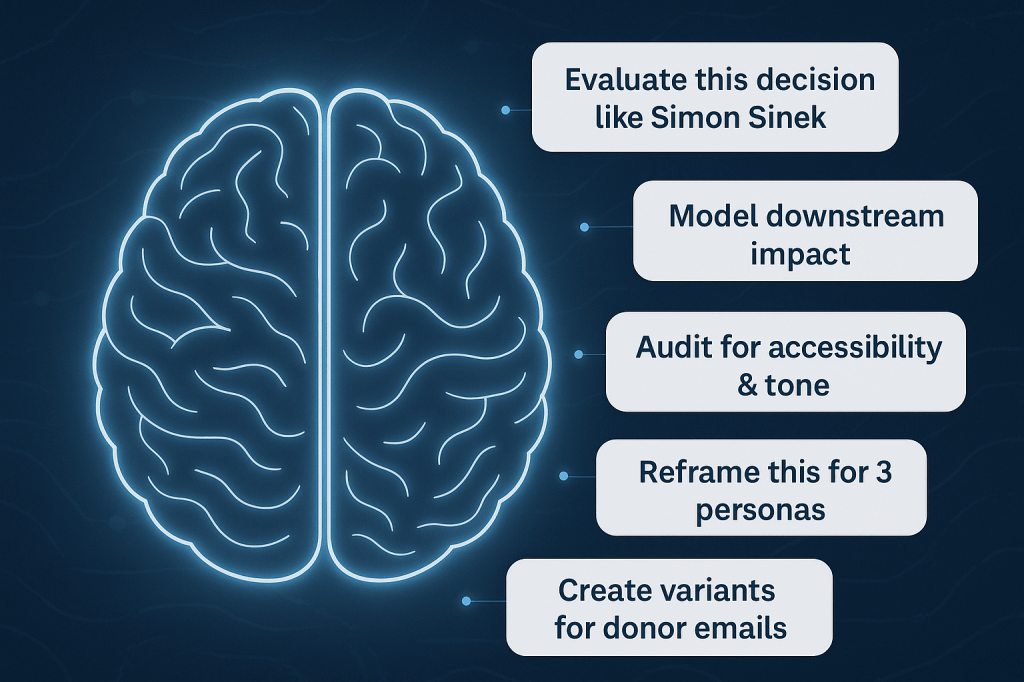
brain with floating AI prompts

Next generation AI prompts and how they will transform work in 2026

AI tools are evolving rapidly, but the real revolution isn’t just in smarter algorithms. It’s in how we prompt, guide, and collaborate with these systems. If the prompts of 2023 were “write my blog post” or “summarize this article,” the prompts of 2026 will reshape what it means to think, decide, and work.

Let’s look at some next generation AI prompts, why they matter, and how you can build this power skill to stay ahead. 

The shift from simple commands to strategic collaboration

Ask anyone who used ChatGPT or other LLM-powered tools in 2023, and you’ll hear the same story. AI made everything a little bit easier and a lot faster. With one command, you can have AI write an email or social post, create a checklist or edit your content.

But as AI becomes central to every knowledge worker’s toolkit, prompts will become less about one-off tasks and more about nuanced collaboration. Your AI assistant is moving beyond “do this” to “think with me.”

This shift is significant, because in the coming years, those who master strategic prompting will set the standards for efficiency, insight, and impact in the workplace. It’s a difference as fundamental as learning Google search in the 2000s or project management basics in the 2010s.

What makes a next generation AI prompting different

Great prompts in 2026 won’t just be clear and specific. They’ll embody a new kind of leadership:

  • Context-rich and goal-oriented

The best prompts give the AI backstory, constraints, and a desired end result.

  • Intellectual integration

You’ll blend expert opinions, critique decisions, and ask AI to serve as a challenger or thinking partner and not just a content generator.

  • Multi-format and multi-step

Modern prompts will expect the AI to analyze, summarize, synthesize, and output results for different stakeholders and channels at once.

  • Bias-awareness and inclusivity

Instead of simply generating content, top prompts instruct AI to screen for accessibility, conscientious language, and systemic impacts.

  • Consequential foresight

The leading edge of prompts will model downstream effects and surface scenarios leaders need to plan for.

Prompt engineering will be a core skill

Prompting is no longer about getting decent results out of a clunky tool. It has become a core operating skill for strategists, analysts, marketers, product leaders, and executives. Those who learn the new prompt language will get more out of their AI partners and spend less time bridging gaps between what they want and what AI delivers.

Next generation AI prompt examples

Here are examples and use cases that showcase what prompting mastery will look like by 2026. Adapt and experiment with these to boost your own workflows.

Rethink decision-making with a strategic partner

Prompt:

Act as my strategic thinking partner. Here’s what I’m stuck on…

Use case example: “Act as my strategic partner. I’m trying to decide whether to invest more in international student recruitment or in expanding adult learner programs. Here’s what I know so far…”

AI is no longer a passive assistant. By inviting it in as a strategic partner, you unlock cross-checks, scenario planning, and perspective-broadening dialogue. This is especially powerful in complex decisions where human bias or bandwidth might limit analysis.

Synthesize leading thinkers and frameworks

Prompt:

Combine the perspectives of [Author A] and [Author B] to critique this idea.

Use case example: “Evaluate our plan to restructure team check-ins from weekly all-hands to asynchronous updates, using the leadership frameworks of Cy Wakeman and Simon Sinek. What strengths, risks, and cultural impacts should we anticipate?”

This prompt pits efficiency and accountability (Wakeman) against connection and inspiration (Sinek), which is a common tension in remote and hybrid leadership. It forces AI to weigh emotional truth vs. emotional management, and productivity vs. purpose.

Engineer persuasive content with behavioral insight

Prompt:

Analyze this content for psychological triggers, then rewrite it to resonate with [audience persona].

Use case example: “Review this alumni donation page. What psychological levers are being used? How could this better resonate with first-gen students from rural areas?”

Personalized, high-impact content becomes standard, not a luxury reserved for big brands. The best prompts look beyond surface-level edits to shape content for real emotional effect.

Summarize, reformat, and distribute 

Prompt:

Turn this 2-hour meeting transcript into 5 action items, 3 questions for leadership, and a Slack post summary.

Use case example: “Here’s a Zoom transcript of our design sprint. Give me a TLDR, stakeholder-specific summaries, and a timeline.”

Why it matters:

AI becomes the go-to tool for knowledge distribution. You get actionable summaries and communication-ready outputs in minutes, saving leaders and teams hours each week.

Personalize communication at scale

Prompt:

Create multiple message variants based on this user’s behavioral data and communication style.

Use case example: “Using Clive campaign data, generate 3 re-engagement email variants that match a warm but efficient tone. Target parents who clicked the financial aid link but didn’t convert.”

AI-powered personalization shifts from nice-to-have to standard operating procedure, equipping teams to address micro-segments and individuals with far greater relevance.

Audit for values, ethics, and inclusion

Prompt:

Audit this content for accessibility, inclusivity, and ethical phrasing.

Use case example: “Scan this chatbot script for bias, stereotype triggers, and readability below a 9th-grade level.”

With increasing regulatory pressure and cultural expectations, prompts that screen content for bias, accessibility, and inclusive language become non-negotiable. These help protect brands and empower more equitable engagement.

Anticipate outcomes and design responsibly

Prompt:

Help me think through the downstream consequences of this product feature.

Use case example: “We’re launching an AI-powered tutor to help students with writing assignments. What are the second- and third-order effects? What should we prepare for?”

The skill of prompt engineering extends into systemic thinking. You’ll use AI to challenge your vision, anticipate unintended effects, and identify risks early.

Benefits of next-level prompting

Adopting these advanced prompting techniques leads to:

  • Faster, more relevant decision cycles: Actionable insights and summaries delivered in the moment.
  • Consistency and inclusivity: Communication that meets ethical standards and resonates with diverse audiences.
  • Personalization at scale: Content and outreach that meet users where they are.
  • Operational efficiency: Multi-step summaries, reformats, and distribution handled in minutes.
  • Foresight and risk management: Better anticipation of systemic impacts and ethical considerations.

Prompt engineering can be the key to more intentional, resilient, and creative teams.

Leading in the age of AI-native work

Prompting is no longer about wringing results out of black boxes. It’s about leading strategic, creative, and responsible collaboration between human and machine.

If your prompts still sound like “write an email,” now is the time to level up. The future belongs to those who know how to ask better questions, challenge assumptions, and guide AI as a true thinking partner. Start practicing these prompts today, and position yourself (and your organization) to stand out in the next AI-powered chapter of work.

What about you? What are your best examples of next-gen prompts?

Fostering innovation despite the daily routines

It’s easy for all of us to get caught up in our daily work and routines, especially if you have a well-established team and product. If your company is growing, so are the expectations of your stakeholders, so you feel fortunate if you’re part of a well-oiled machine and if you have your individual fires under control. But wait. You need to innovate. You want to set your company and your customers up for long term success, and you can’t do that if you’re either complacent or constantly fighting fires. Let’s think about some things you can do to foster innovation without giving up your regular responsibilities.

ShipIt Days

I can’t say enough good things about what we at Hannon Hill call ShipIt Days, more commonly known as FedEx Days. While the logistics of the implementation may vary for each organization, the general idea is that each team member chooses a project to work on for 24 hours, either on their own or in collaboration with others (if it’s someone from another department, consider this a win), to produce a product of some kind. The result could be a new feature, a process improvement, a recommendation for a new tool to use, additional documentation for your users, or a brand-new company initiative. Don’t put any parameters on what your staff can select. Let them run with their ideas. Be sure to provide delicious and nutritious meals. After 24 hours, have each individual or team present their project. Part of the presentation should be to deliver a rollout plan. We actually just had a ShipIt Day last week, and I can honestly say that each project needs to be implemented.

Task Forces

One of the best ways to collaborate with people outside of your department is to join a task force. This could be any initiative that you feel passionate about, such as improving customer service, making the office environment more fun and productive, incentivizing a healthy lifestyle, or optimizing the QA process. Task forces allow your team members to pursue causes that they are passionate about, and they can really get people to think outside their daily routine and make suggestions that can be course-changing.

Team Meetings and Activities

I know, I know. You want to reduce the number of meetings. However, don’t underestimate the power of weekly team gatherings. If possible, have a catered lunch, as eating together is a nice bonding experience. In order to make those meetings more interesting and less monotonous, consider letting different departments take over as hosts. Maybe one day, you can all watch a TED talk together and discuss it afterwards. Another time, ask each team member to talk about their favorite productivity hack.

Team activities outside of regular meetings can also provide new perspectives. For instance, we do community service once a quarter, such as planting trees, or helping at an animal shelter or schools. Even though those activities have nothing to do with our software, giving back to the community refreshes our sense of purpose and gets us out of our own heads.

Retreats

A change of scenery can invigorate your innovative mindset, and annual retreats are an excellent way to recharge. Be sure to mix fun and strategic activities. For instance, you can start off the day by dividing your team into groups and asking each group to work on a presentation on a specific topic such as “What are the top three challenges for our company and what do you recommend we do to overcome them?”. Once everyone has presented, the fun activities can begin.

Suggestion Box

The good old suggestion box can be an effective way to encourage people to share their ideas. You can also create a virtual box, which can be as simple as a Google spreadsheet. After every month or every quarter, have your team members vote on the best and reward the winner with a gift.

Understood Empowerment

Some of the most innovative ideas are born in an environment in which people know that they are not just allowed but encouraged to try new things. Whenever possible, let your team members spend time on special projects, celebrate change, let (fast) failure be okay, and have ad hoc conversations in which you ask poignant questions and solicit suggestions.  

When it comes to innovation, don’t just think about your product, but also about your processes, your office environment, your policies, and every aspect of your company. When done right, all of it will be reflected in better products and better service.

What about you? How do you encourage innovation while keeping up with your daily tasks?